 SlideShow Bob V1.3
Here is a handly little image viewer that you can use to turn your Windows computer or tablet into a digital photo frame! Slideshow Bob will play all the JPEG pictures that you took on your digital camera. Also it will show GIF or BMP pictures.
SlideShow Bob is portable. You can put it on a memory stick, CD, or DVD along with your pictures, and use it to view the photos. It can be used on any Windows computer including Windows 95, 98, XP, Vista, Windows 7, 8, 8.1, 10, and 11. No installation is required; you just run the program.
Most versions of Windows come with a picture viewer program, but Slideshow Bob does a few things the standard viewer doesn't do:
- Slideshow Bob will play all the photos in a folder one after the other, automatically advancing to the next photo every few seconds.
- Slideshow Bob will play any WAV sound files that accompany your photos. (Some digital cameras can record a sound clip with each picture, or you can use Windows to record your own sound clips for narration.)
- While viewing photos, when you see one you especially like, with one click of a button you can copy it to another folder (for your favorites).
Of course you can buy sophisticated software that will do these things and more, but SlideShow Bob is free. Plus it's very small and quick to download.
When you start SlideShow Bob, it presents a window where you choose the folder containing your pictures. Then it shows a brief instruction screen, identifying the functions you can do while viewing photos. Pressing the space bar will display the first photo at full screen size, and pressing it again will display the next one. Or you can set a timer to automatically advance every few seconds.
Slideshow Bob will show photos in alphabetical order of filename. Typically your digital camera will name photos with a name and sequence number such as PIC00001.JPG, PIC00002.JPG, etc., in which case Slideshow Bob will show them in the order taken. Alternately you can use Windows to rename the files so that they are organized differently, and they will play in order of the names that you have assigned.
Some digital cameras give you the option to record a ".WAV" sound clip along with each photo. That gives you the opportunity to say the names of the people in the photo or to describe the occassion. Slideshow Bob will automatically play the ".WAV" sound clip with each photo. For example, for PIC00001.JPG, it will look for PIC00001.WAV and play it if found.
 |
Click here to download the software. The download file is about 1.4 MBytes (tiny!), so it will download very quickly. |
The download is a self-decompressing Zip archive, stored as an executable file called "SlideShowBobV1R3.EXE". Put it on any folder you want, or on a memory stick, and then run it. This will appear:
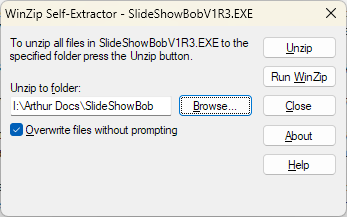
Choose any folder you want, and then click UnZip. The program and it's 7 runtime libraries (.DLL files) will be put into the folder. Then you can run it by finding "SlideSho.exe" in the folder and double-clicking it.
When Slidesho.EXE starts, it will display a pop-up window for navigating to the folder where your pictures reside:
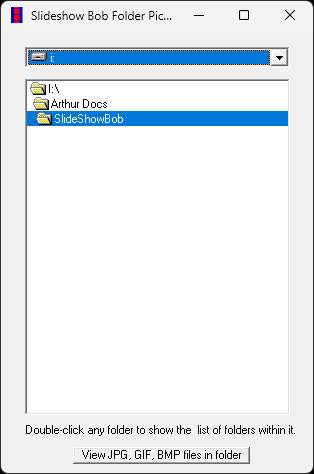
After picking the folder, a menu will be displayed on the upper-left corner of the screen. Press the space bar to display one of your pictures at full-screen size, and again to advance to the next picture. F1 is the help key that brings the menu back, where you can select continuous play or other options. The ESC key ends the playback.
This SlideShow Bob download page is hosted by Freelance Wizards Inc. (Canada)